
Notion is changing how teams pay for AI. For companies using Notion Agent or building Custom Agents, the first thing to understand is the new credit system: what each person gets, which work uses those credits, and who pays when an agent runs for the whole team.
On October 19, Notion announced a new pricing in this post Agents, rebuilt to do more for less. The update includes a smarter Auto model router, longer-running agents and new admin controls. But the credit changes deserve the first look, especially if one or two people build most of your team's agents.
The new Notion AI credit system
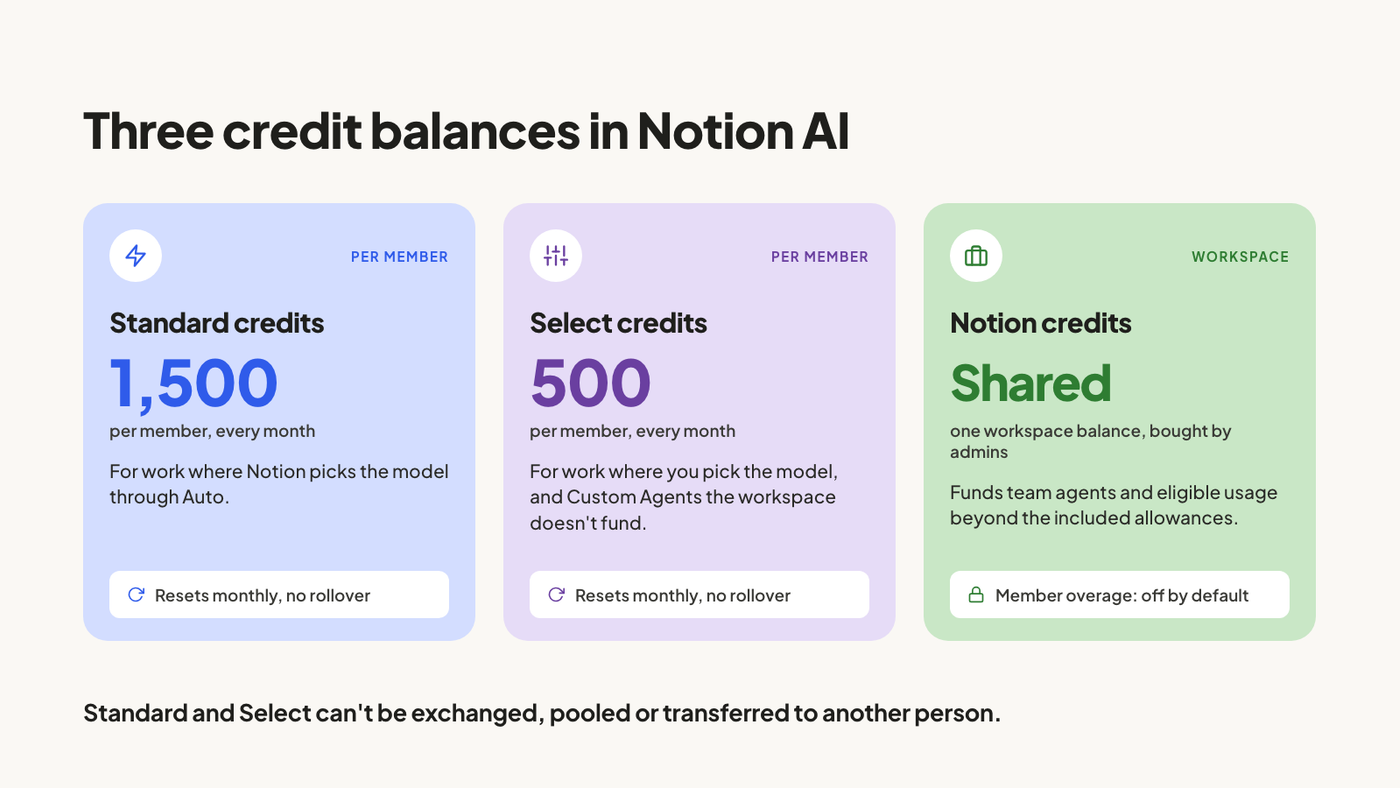
Business and Enterprise plans now include two monthly credit allowances per member:
- 1,500 Standard credits for work where Notion picks the model through Auto.
- 500 Select credits for work where you pick the model yourself, or run Custom Agents that aren't funded by the workspace.
Those are the published allowances. Notion notes that included amounts can vary with your plan and purchase arrangement, so check your actual allowance in Settings → Notion AI → Usage.
Standard and Select are separate balances. You can't exchange one for the other, pool them across the team or transfer unused credits to another person. They reset monthly, and unused credits don't roll over.
There is also a separate, workspace-managed balance called Notion credits. Admins can purchase these to fund team agents and cover eligible usage beyond the included allowances. Allowing members to continue on workspace credits after reaching their limits is off by default.
The new system starts on October 19, 2026 for new Business and Enterprise workspaces. Existing workspaces move over on November 2, 2026. Notion's credit guide explains the allowances and settings.
Being able to try Custom Agents with included Select credits is a welcome change. You no longer need to purchase additional credits just to start testing them. But an allowance for getting started isn't the same as a budget for running a team's recurring work.
Start with the people who build your Custom Agents
Before buying more credits, look at who creates the agents in your workspace.
In some teams, that work is concentrated in one person or a small group. They build the agents, test them, maintain the instructions and share them with everyone else. Their credit needs can be very different from those of a colleague who mainly uses AI to summarize pages or draft text.
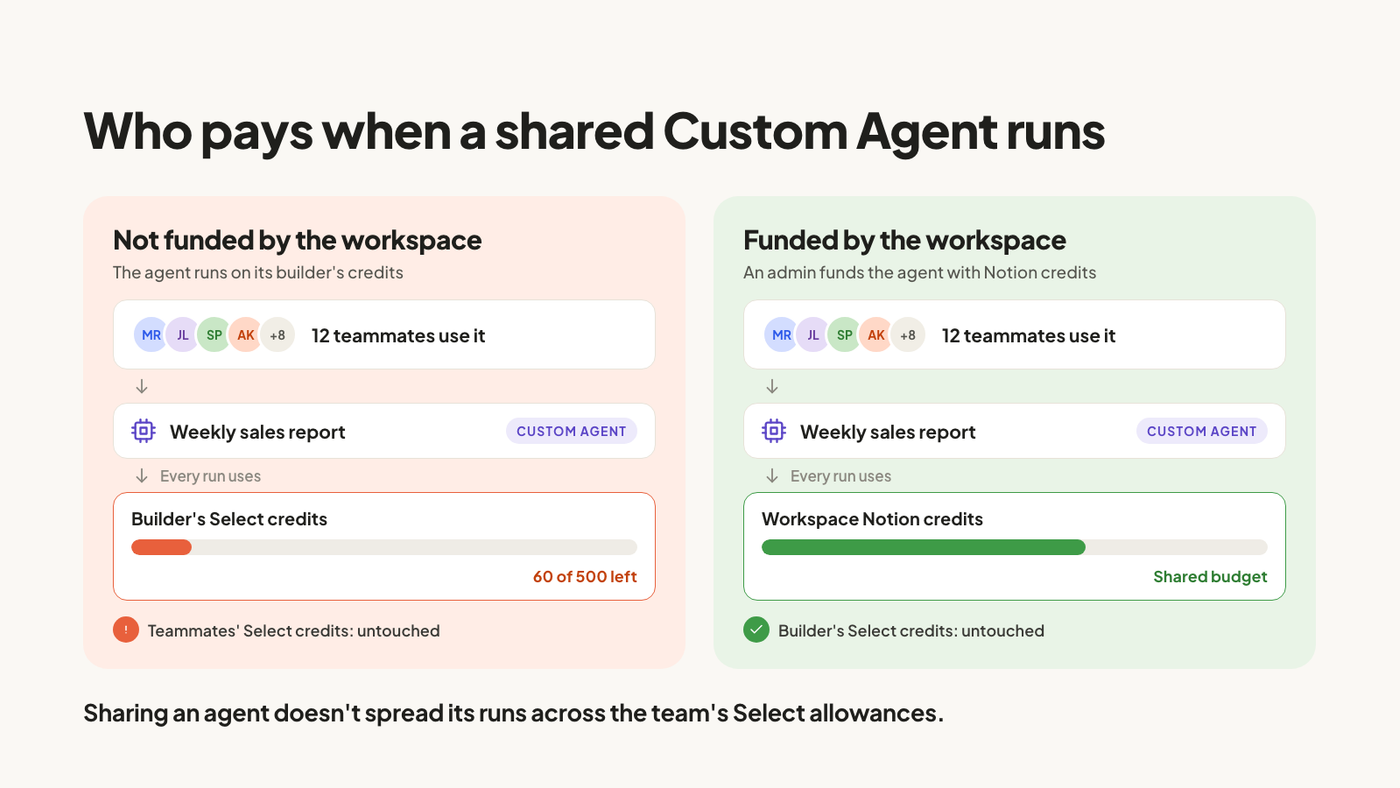
There is an important detail in Notion's documentation: a Custom Agent you set up uses your Select credits even when you share it with your team, unless an admin funds it with workspace Notion credits.
Imagine one person builds several agents that the rest of the company uses. Sharing those agents doesn't spread their consumption across everyone's included Select allowance. Other members may have credits left while the builder's allowance is being used by shared work.
That is why we would review the team before deciding on a budget:
- Identify who creates and owns the Custom Agents, including the person or group responsible for most of them.
- Check which agents are personal experiments and which support recurring team workflows.
- Review how often each agent runs and how much it actually consumes. The number of agents alone won't tell you enough.
- Decide whether the builder needs additional budget or whether shared agents should be funded directly by the workspace.
- Assign someone to review consumption and approve changes to that budget.
The point isn't to give every member more credits. It's to put the budget where the work is happening. You also can't solve a heavy builder's needs by transferring colleagues' unused Standard or Select credits, because those allowances aren't transferable.
For the wider mechanics of seats and billing, see our guide to how Notion pricing works.
Auto changes the cost of choosing a model
Auto is Notion's model router. It reads a task and chooses a model based on quality, speed and cost. Simple requests can go to faster, cheaper models, while more difficult work goes to more capable ones. Notion says Auto can also switch models if the current one isn't making meaningful progress.
In its own evaluations across more than 20 common use cases, Notion reports results similar to Opus 5.5 and Astra at about 90% lower average cost. That is the basis for its claim that credits go roughly ten times further with Auto.
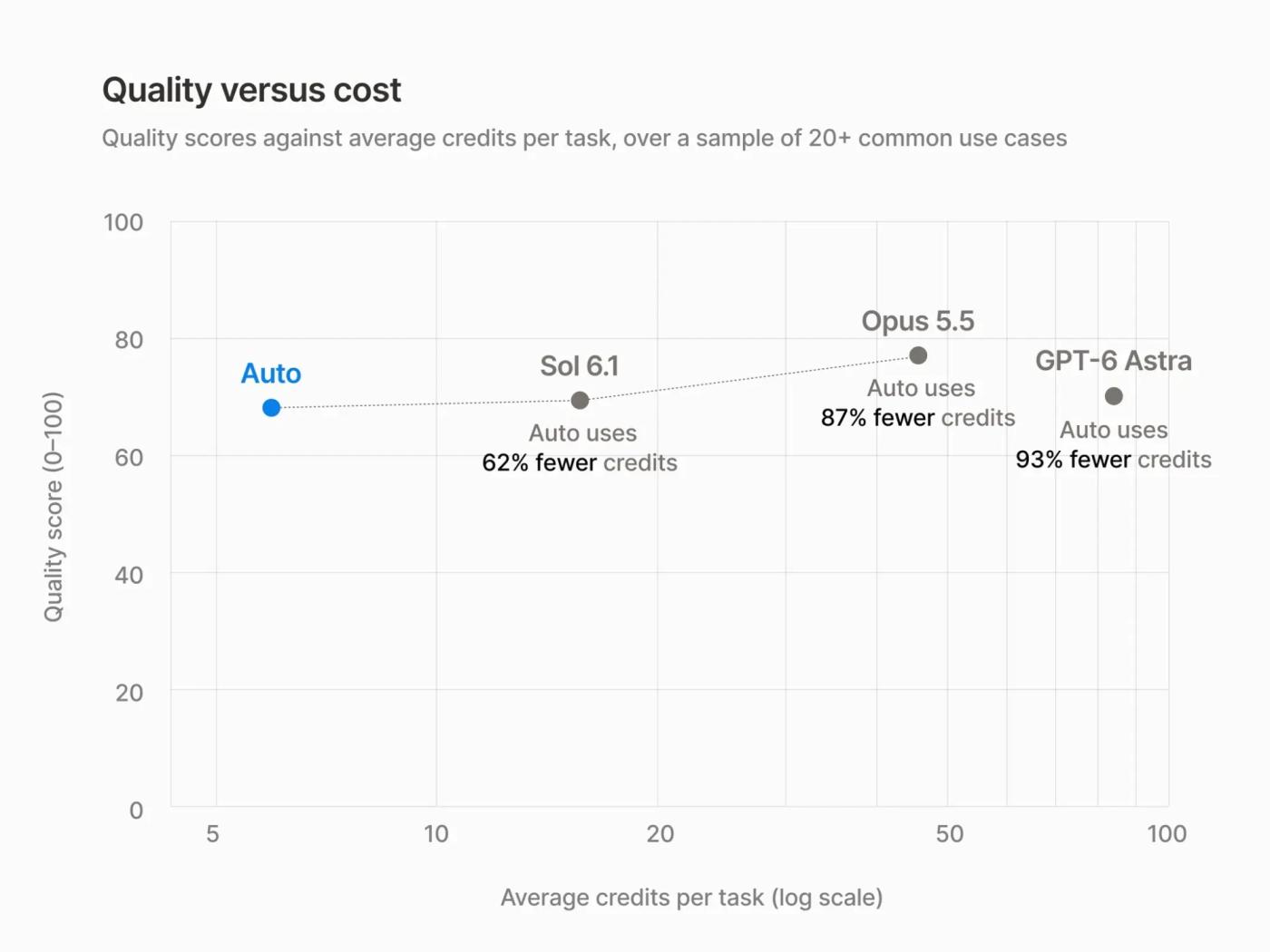
A lower average cost in Notion's tests doesn't tell you exactly how much your particular workflow will consume. The useful comparison is the result you get, the time it takes and the corrections you need to make, alongside the credits spent.
Test, test, then test again
Once you've reviewed ownership and budgets, try the work your team actually needs to do.
Pick a recurring task and run it several times with comparable inputs. Record the time, credit consumption, whether the result is correct and how much human correction it needs. If you compare Auto with a manually selected model, use the same task and the same success criteria.
For CSV work, for example, don't stop at checking whether the agent says it finished. Check that the analysis answers the question, or that the imported rows, values and property mappings match the source file. A faster run is useful only if the output is right.
Try a less straightforward case too: a larger file, missing values or a task that needs several steps. One successful demonstration isn't enough to decide how a workflow will behave every week.
Then adjust the instructions or model choice and repeat the same tests. There isn't a shortcut here. Testing your own work tells you more than assuming that a published average will apply to your workspace.
Longer tasks are getting faster in our own use
This is one improvement we've noticed ourselves. Longer tasks used to feel slow, and Notion Agent often struggled with them. Recently, we've seen it getting faster at work such as analyzing a CSV or importing CSV data into Notion.
Notion says it has rebuilt the infrastructure behind Notion Agent and Custom Agents. Sessions can now run for more than 24 hours, compared with five minutes previously. Agents also have computer and browser capabilities, and long conversations and large tool results are handled more efficiently.

According to the announcement, agents run up to 50% faster on web and mobile, and Custom Agent runs cost about 30% less in Notion's testing. Those figures come from Notion. Our observation is narrower: the longer tasks we use are becoming faster to work through.
Longer execution doesn't remove the need for clear instructions or a final check. If you're building repeatable workflows, our guide to Notion Skills covers how we define and test reusable instructions.
Admin controls should make the budget easier to manage
Notion has also announced an AI Command Center that will be coming soon. The goal is to bring usage and governance into one place. Admins will be able to review consumption by member, feature and agent, set spending limits, choose which models members can use and control who can create, pause or archive Custom Agents.
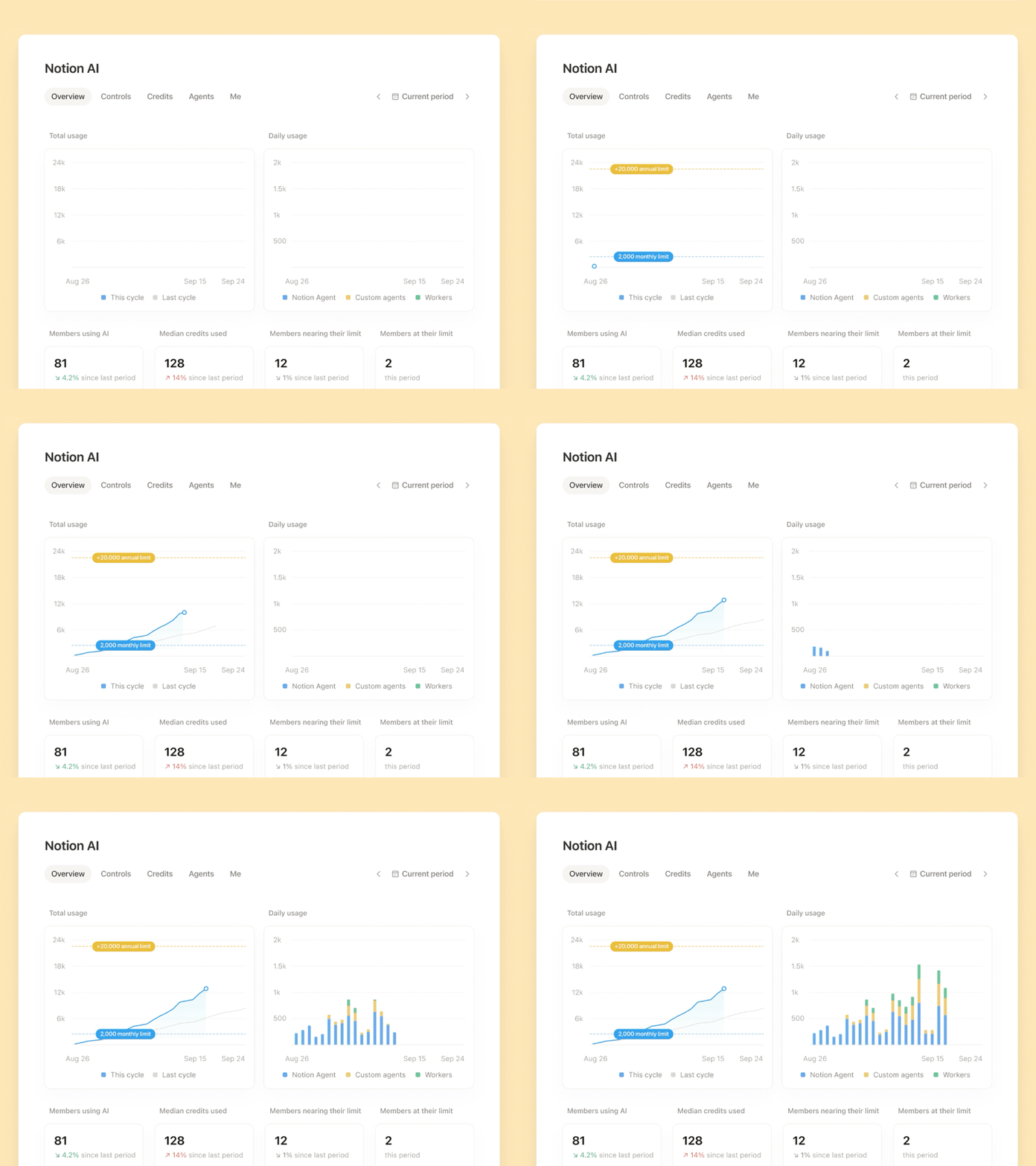
This is an area where we have wanted more clarity. Managing credits has been harder to explain and oversee than it should be, both for admins and for consultants managing workspaces on behalf of clients.
When the Command Center becomes available in your workspace, use it to revisit the builders and shared workflows you identified earlier. Check whether the people doing most of the building have enough budget and whether team agents are funded in the right place.
Other ways to use AI with Notion
The announcement also includes ways to use AI you already pay for:
- You can connect a ChatGPT Plus, Pro or Go subscription to your personal Notion Agent instead of using Notion credits. The connection doesn't cover Custom Agents yet.
- Bring Your Own Key is in private alpha for Enterprise customers, allowing access to their own model-provider keys.
- The updated Notion MCP connects external agents to your workspace. Notion says memory sync is available now, with Skills via MCP coming soon.
These are separate options, not interchangeable ways to fund every agent. In particular, connecting a personal ChatGPT subscription doesn't pay for your team's Custom Agent runs.
What we would do before the full rollout
Check the allowances in your workspace, identify who builds and owns the Custom Agents, and decide which shared workflows need workspace funding. Then test. Repeat the tasks that matter to your team, check the results and review the actual consumption before committing to a larger budget.
If you'd like help reviewing your team's AI workflows, agent ownership and credit needs, book a Discovery Call and we'll look at your setup.