SYS: OK NOXEN.STUDIO / v2026.04 · LYON → WORLDWIDE ▸ SEE OUR TALK AT MAKE WITH NOTION 2025 ↗ NOTION SOLUTIONS PARTNERS / SINCE 2022 LOC: 45.76°N 4.84°E · LYON
NOTION SOLUTIONS PARTNERS SINCE 2022
// lab index
SECTION [02] AI-LAB
FOCUS NOTION AI · AGENTS · SKILLS
TOOLS LIVE 2 OPEN · 2 INTERNAL
STANCE OPINIONATED
noxen/ai-lab

02. AI is a tool, not a strategy

How we think about Notion AI, agents, Skills, and automations: when to use each, where they fail, and the tools we've built.

Most teams don't need more AI. They need to apply it where it actually adds value: in the right place, for the right job.

Every week someone asks us whether to build a Custom Agent, set up a Skill, or wire an automation. Most of the time the real answer is the same: none of them yet. Fix the data first.

This page is how we think about the rest of the problem. Opinionated, incomplete, and revised every time Notion ships something that changes what we thought.

§ 01 / THE FRAMEWORK

Three questions to pick the right tool

Before you build anything, answer these in order. Start from the problem, not the tool. Sometimes the honest answer is a Custom Agent, sometimes no AI at all.

QUESTION 01 Is the task deterministic?

Does the task always produce the same result for the same input?

YES · DETERMINISTIC
Build an automation and move on.

Rules, triggers, formulas, webhooks. No model needed: an automation built with Relay.app, n8n or Make can do the work. And now, even a Notion Worker could be a better option.

→ VERDICT: AUTOMATION
NO · NEEDS JUDGMENT
Go to Question 02.

The output varies with context, tone, or reasoning. You need a model in the loop, but not necessarily an agent.

→ NEXT: QUESTION 02
QUESTION 02 Is the work inside one document?

Does the model need to read, write, or transform content inside a single Notion context?

YES · ONE CONTEXT
Configure a Skill. Reuse it forever.

Summarize a meeting doc. Rewrite a brief in your brand tone. Translate a policy. Extract action items. Skills are fast, cheap, and everybody in your team can use them.

→ VERDICT: NOTION SKILL
NO · CROSS-CONTEXT
Go to Question 03.

You need information from multiple documents, databases, or external sources. The model must navigate, not just transform.

→ NEXT: QUESTION 03
QUESTION 03 Does it need to plan?

Does the task require the model to decide its own next step across multiple tools or sources?

YES · MULTI-STEP
Build a Custom Agent with strong guardrails.

Pull the CRM, cross-reference the roadmap, draft a weekly digest, post to Slack. Agents are powerful, consume Notion AI Credits, and are "independent". Treat them like a specialized one-task junior hire.

→ VERDICT: CUSTOM AGENT
NO · ONE-SHOT
Stay on a Skill. Don't over-engineer.

If the task is cross-context but one-shot, a well-designed Skill with links and mentions beats an agent 9 times out of 10. Start there.

→ VERDICT: NOTION SKILL (COMPOSED)
01/03
→ WHEN DETERMINISTIC

Automation.

A rule, a trigger, a webhook. No model in the loop. Built in hours, runs for years, never hallucinates.

RULE OF THUMB If you can write it as if X then Y, don't put a model on it. You're just buying a slower, more expensive, less reliable version of the same logic.
02/03
→ WHEN JUDGMENT, ONE CONTEXT

Notion Skill.

Scoped prompt, attached to a page or database. Reads and writes inside one context. The workhorse: most of what you want is a Skill.

RULE OF THUMB Give the model one job, one context, one output shape. If you can't describe what the Skill should do in a couple of paragraphs, it's not a Skill — you probably need more than one.
03/03
→ WHEN MULTI-STEP

Custom Agent.

Plans, calls tools, chains steps. Use sparingly. Monitor obsessively. Budget for the weeks when it silently does the wrong thing.

RULE OF THUMB Treat every agent like a new "junior hire". It needs scope, supervision, a weekly review, and a boss (you). Without those, it can do more harm than good.
§ 02 / IN PRACTICE

Six real use cases, and what we actually built for each

Six real situations we've seen and the call we made. Not always the flashiest tool: the one that fits the need.

// SCENARIO 01 · CRM AUTOMATION AUTOMATION

When a deal moves to Closed Won, create the onboarding project and invite the CS lead.

Deterministic. One trigger, one branch, two writes. A native Notion automation or an external automation built with Relay.app does this in 40 seconds and is less prone to errors.

WHY NOT SKILL
No judgment. The trigger and the writes are identical every time.
WHY NOT AGENT
Nothing to plan. Putting an LLM here would add latency, cost, and failure modes with nothing in return.
// SCENARIO 02 · MEETING NOTES NOTION SKILL

Turn raw meeting notes into decisions, action items, and a one-line summary, in our usual format.

Needs judgment. One context (the page). One output shape. Perfect Skill territory: attach it to the Meeting Notes database and it runs on every new row.

WHY NOT AUTOMATION
No rules can identify "the decisions" reliably. That's judgment.
WHY NOT AGENT
An agent could handle it too, but a Skill keeps the PM accountable for the first pass. They decide what counts as a decision and what as an action item — judgment that AI gets wrong often enough to keep a human in the loop.
// SCENARIO 03 · EXEC DIGEST CUSTOM AGENT

Every Monday, produce a 1-page exec brief pulling from CRM, product, finance, and shipping.

Triggered every Monday morning without anyone pressing a button. That level of independence — kicking itself off on a schedule, gathering data across CRM, product, finance, and shipping, drafting the brief — is what makes it a Custom Agent. It still needs a human review before it ships.

WHY NOT SKILL
A Skill needs someone to press the button. This kicks itself off every Monday at 7 AM with nobody in the loop — that's agent territory.
GUARDRAILS
Read-only data access. Draft to a private page. A human sends it.
// SCENARIO 04 · BRAND TRANSLATION CUSTOM AGENT

Rewrite customer-facing copy in your brand voice, localized to EN / ES / FR.

A Custom Agent with your brand voice document attached, triggered every time a new customer-facing document lands in the database. It produces the localized versions on new pages and pings Slack when it's done. Brand voice stays consistent across docs without anyone having to attach a tone card every time.

WHY NOT SKILL
A Skill needs someone to press the button on every new doc. An agent picks it up automatically and handles the localization end-to-end.
GUARDRAILS
Brand voice document is the source of truth. Drafts written to new pages, never overwrites the original. Slack notification on completion so a human can review before sending.
// SCENARIO 05 · FORM INTAKE AUTOMATION

Inbound form → all the data into Notion → ping the right Slack channel.

No model needed. A submission lands, the automation writes every field into the right Notion database, and pings the Slack channel where the right team picks it up. Centralizing intake in one place is already a huge win — no AI in the loop.

WHY NOT SKILL
Every field has a known destination. No judgment, no synthesis — the same write happens every time.
WHY NOT AGENT
Nothing to plan or decide. A model adds latency, cost, and points of failure for no real benefit.
// SCENARIO 06 · CONTENT AUDIT CUSTOM AGENT

Quarterly audit of the knowledge base: stale, duplicated, contradictory.

Needs to crawl, compare, reason across pages. An agent with read access to the workspace and write access to a review queue earns its cost here, once per quarter.

WHY NOT SKILL
You configure the agent once and it runs every quarter on its own. A Skill needs someone to remember to invoke it on every page, every time.
GUARDRAILS
It never edits. It flags. A human runs the triage from the queue.
§ 03 / HOW WE SHIP

How we ship AI responsibly

Four principles we apply before every Skill, every Agent, every Worker. Without them, AI is a liability. With them, it earns its keep, quietly, for years.

PRINCIPLE 01

Fix the workspace before you touch the model.

AI amplifies whatever sits underneath it, including the mess. A sharp prompt on top of a messy database looks clean for three weeks, then breaks once volume picks up. We audit the workspace first, then decide what (if anything) to automate, and where we need to apply AI.

IN PRACTICE: Every engagement starts with Notion Map Buddy. If the workspace scores a 4/10, we fix the 4 before we ship a line of prompt.
PRINCIPLE 02

Write the scope down. Read it back.

Every Skill, every Agent, every Worker gets the minimum viable access: read-only by default. Scoping takes more time than building, and that's exactly the point.

IN PRACTICE: One service account per Worker. One access boundary per Agent. Nothing touches a database it doesn't need to.
PRINCIPLE 03

Always start with the simplest tool.

Automation first, Skill next, Agent only when necessary. Most teams reach for an Agent because it sounds modern, and end up spending three months debugging it. The decision tree (above) exists to stop that from happening — on our side and on yours.

IN PRACTICE: The default answer to "should we build an Agent?" is "not yet — try the automation first." Most asks stop there.
PRINCIPLE 04

Train the client to own it.

Every Skill and Agent ships with a handover: the client team edits prompts, reads logs, and kills it if it misbehaves. No black box, no dependency.

IN PRACTICE: Workshops, internal documentation, and a runbook in every engagement. The client team can update prompts and read logs on their own.
§ 04 / CUSTOM AGENTS

Agents in production

Agents we've built and maintain for clients. Each one earns its place because the task genuinely needed multi-step reasoning across sources, and is scoped with appropriate guardrails.

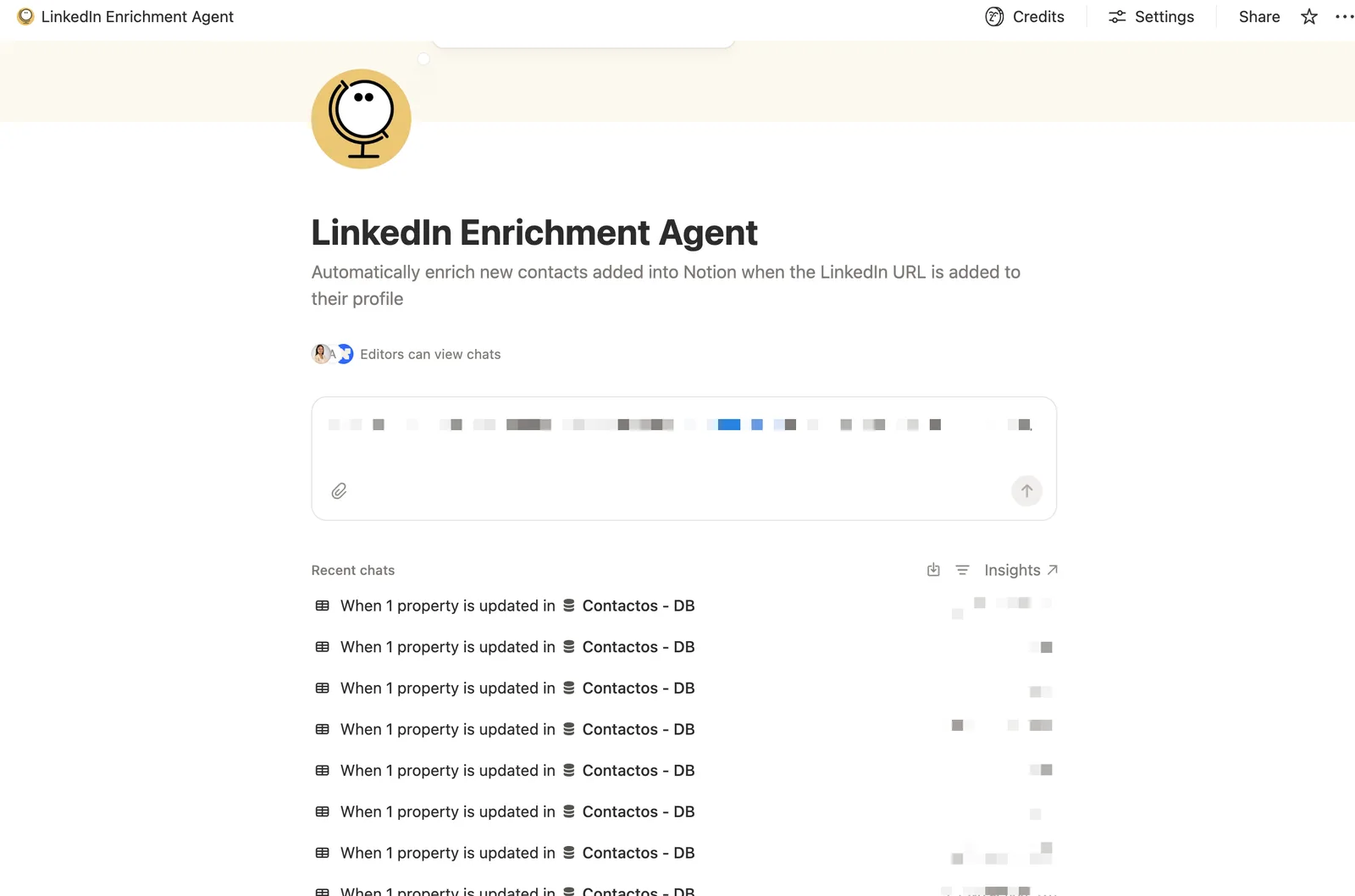
Notion AI Agent screen showing the LinkedIn Enrichment Agent in a chat interface with a list of recent contact enrichment runs.
// AGENT 01 · LINKEDIN CONTACT ENRICHER

Automatic enrichment of Notion contacts for Inclimo, a climate tech VC.

When a new contact lands in the CRM, the agent pulls the LinkedIn profile and fills in role, career, areas of expertise, and education. Analysts save 10–20 minutes of manual search per profile, and they review many every day.

THE TASK
Web search and synthesis across sources. Fits an agent, not a Skill or automation.
TOOLS
Notion · internet access
GUARDRAILS
Only reads LinkedIn. No access to other pages in the workspace. Only writes to the contact that triggered the run.
CADENCE
Event-driven · on every new contact created
STATUS
LIVE
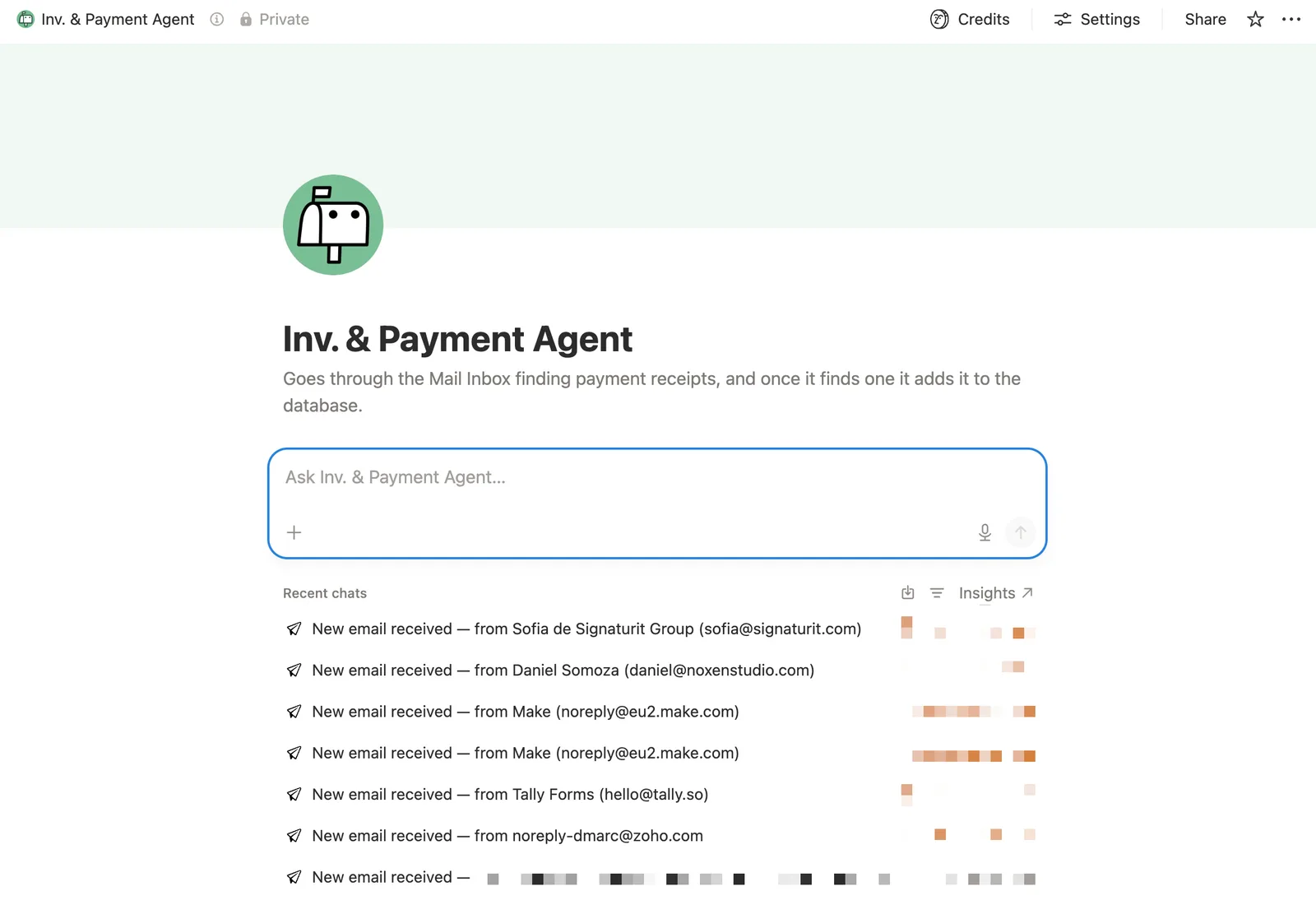
Notion AI Agent screen showing the payment-detection agent reading the Notion Mail inbox and writing structured charge data into Notion.
// AGENT 02 · PAYMENT DETECTION

Automatic reading of payment receipts in Notion Mail.

Scans the Notion Mail inbox and, when it finds an email with a payment receipt, records the charge and all payment data into Notion. No more manually copying numbers between emails and spreadsheets.

THE TASK
Identification with judgment + structured writes. Fits an agent, not an automation.
TOOLS
Notion Mail <> Notion
GUARDRAILS
Only reads the inbox. Only writes to the payments database.
CADENCE
Event-driven · on every email received
STATUS
LIVE
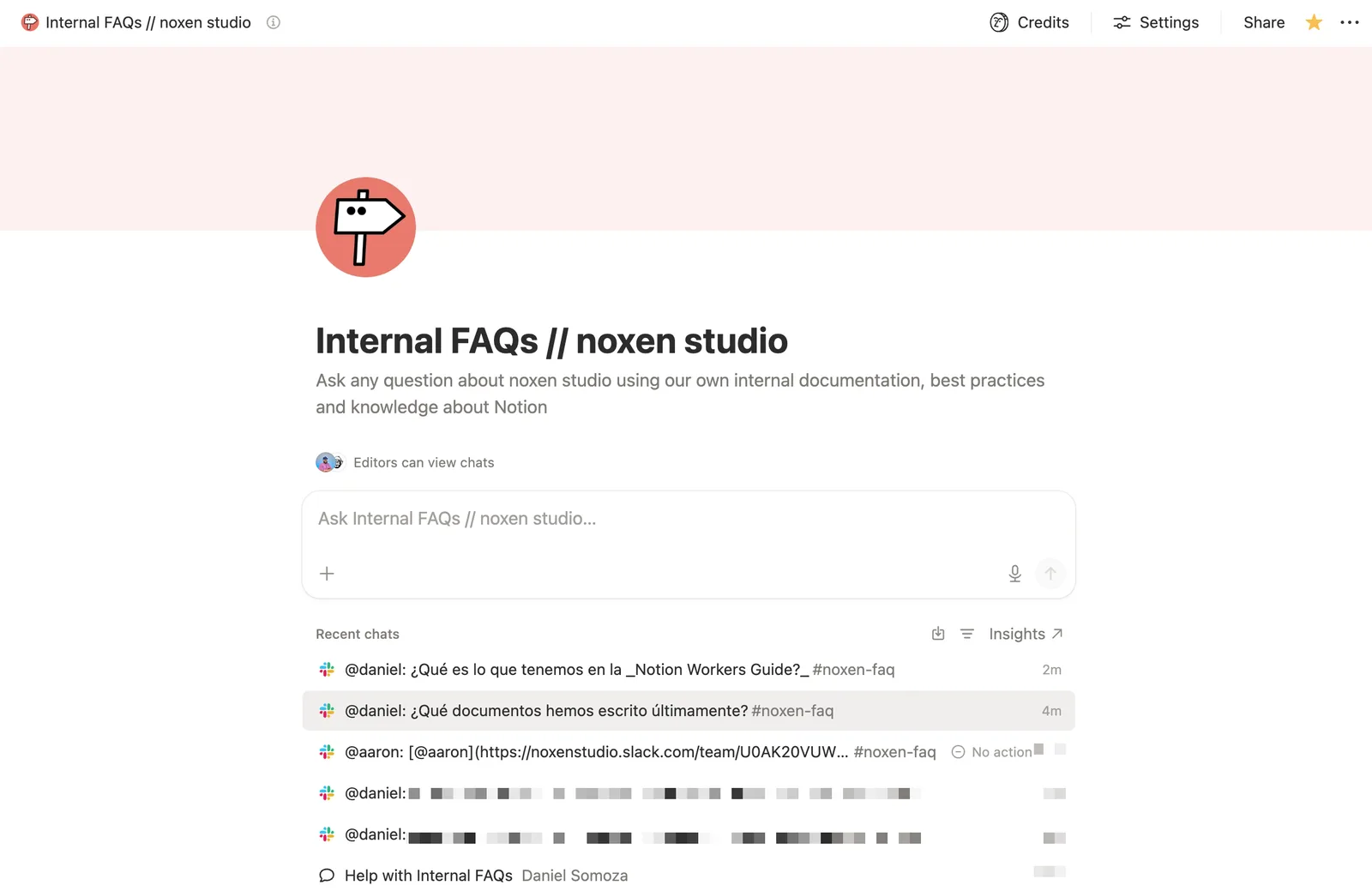
Notion AI Agent screen showing the internal-knowledge agent answering FAQ-style questions from the team's Notion documentation.
// AGENT 03 · INTERNAL KNOWLEDGE

Search across our internal knowledge base from Notion or Slack.

Ask the agent directly or from a Slack channel: it pulls the answer from our internal Notion documentation. Smoother onboarding for new teammates and fewer pointless Slack threads, emails, and meetings.

THE TASK
Contextual retrieval with judgment across multiple pages. Fits an agent.
TOOLS
Slack <> Notion
GUARDRAILS
Only reads the internal knowledge base. Doesn't write or edit.
CADENCE
Event-driven · on every question
STATUS
LIVE
§ 05 / NOTION WORKERS

Notion, at the center of your stack

Thanks to Notion Workers, Notion can finally sit where your team already thinks it sits: in the middle, interacting with the rest of the tools in your stack. The AI lives in Notion. The integrations live outside.

Your team stops tab-hopping. One interface, Notion AI, reads, writes, and reasons across the tools you already pay for. We build the workers that make that real.

01 / LIVE
// WORKER · BENTO

Bento-worker.

Gives Notion AI the ability to read and update Bento.me pages directly from the workspace. Publish landing-page changes without leaving the editorial doc they were written in.

STATUS · LIVE IN PRODSURFACE · 18 TOOL CALLS
02 / LIVE
// WORKER · TALLY

Tally-worker.

Syncs Tally form submissions into Notion and analyses them in place. Surfaces partial submissions so the team can re-engage leads that dropped off before they go cold.

STATUS · LIVE IN PRODSUPERPOWER · PARTIAL-SUBMISSION RECOVERY
↗ / NEXT
// YOUR STACK

The one we haven't built yet.

Whatever tool is keeping Notion from being your single interface, we build a worker for it. HubSpot, Stripe, Cal, Linear, your internal API. All callable from inside Notion AI.

COMMISSION A WORKER
§ 06 / FROM THE LAB

Tools we built for ourselves

We needed them for our work, so we built them and left them open. Use them, break them, tell us what's wrong.

// LAB TOOL 01

Notion ROI Calculator

Plug in your team size, hours lost in meetings and doc-hunting, and your current stack cost. Get an honest estimate of what a Notion overhaul would save, and what it would cost.

TEAM SIZE 42 PEOPLE
HRS LOST / WK 5.8 × 42
CURRENT STACK €4,280 / mo
EST. SAVINGS €87K / YR
PAYBACK ~ 4.2 MONTHS
OPEN THE CALCULATOR
STATUS: LIVE · FREE · NO SIGNUP
// LAB TOOL 02

Notion Map Buddy

A quick diagnosis of your Notion workspace. Paste your workspace export and get a map: what's live, what's stale, what's duplicated, where the fractures are. We use it before every engagement.

OPEN MAP BUDDY
STATUS: LIVE · FREE · WE USE IT ON EVERY ENGAGEMENT
// SECTION 07 · WHAT NEXT

Two ways in

A focused audit if you want our opinion on a specific workspace. Or the lab newsletter if you just want to see what we're figuring out, weekly, in your inbox.

AI Audit · from €1.5k2 WEEKS · DIAGNOSTIC + ROADMAP
weekly · no spam · unsubscribe in one click