
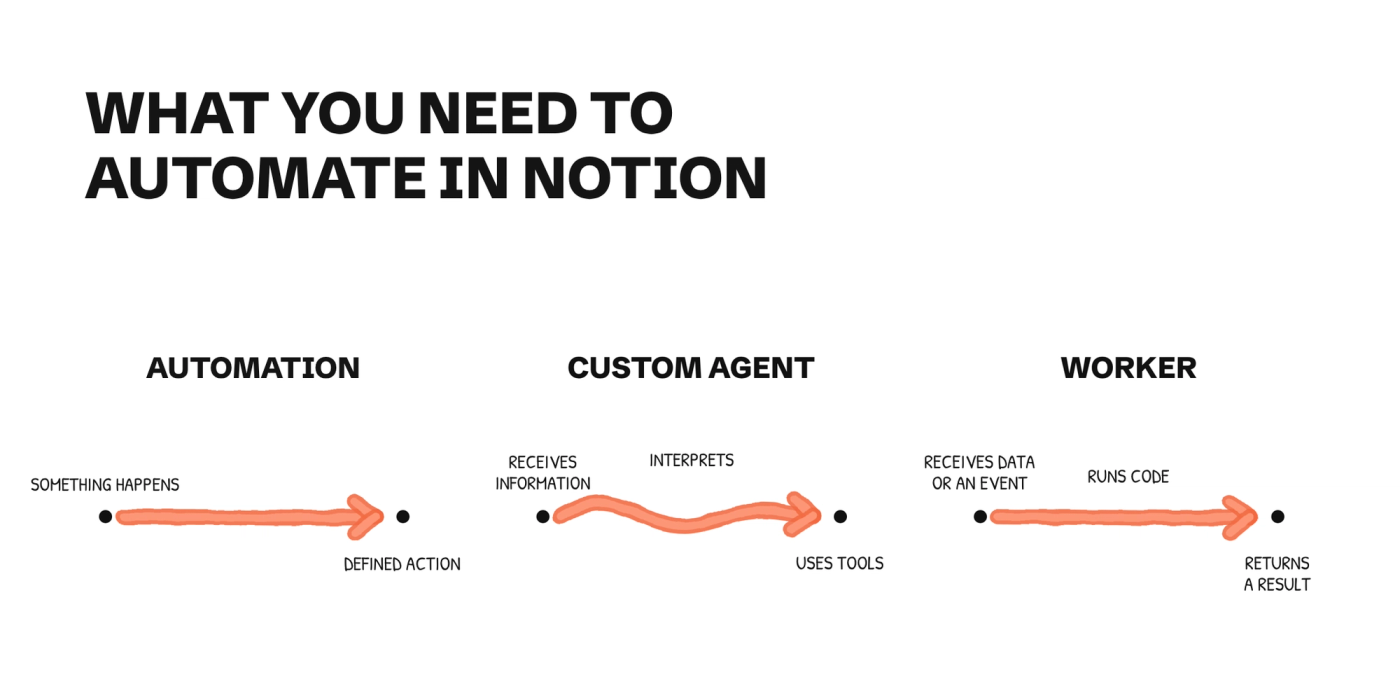
It may not matter much whether what you need is called a Worker, a Custom Agent, or an automation. What you want is to stop copying data between apps or preparing the same report every Friday. But choosing how to do it has consequences: it changes what you pay, the permissions you grant, and who will have to maintain it.
That is why this post aims to clarify which option to choose, along with some tips and advice for each one.
Which option to choose based on the task
Native automation
Applying a fixed rule with the triggers and actions available in Notion.
- What you need: A Plus plan and full access to the database to set it up. There are limited exceptions on the Free plan.
- How it is billed: Included in the plan, with no AI credit usage to apply the rule.
Custom Agent
Interpreting content, preparing a report, or classifying information by following instructions.
- What you need: Business or Enterprise, permission to create one, and explicit access to its sources and tools.
- How it is billed: Uses credits. The amount depends on the model and the work done in each run.
Worker
Keeping external data up to date, running your own logic, or receiving events from another system.
- What you need: Business or Enterprise, permission to create Workers, and someone to develop and maintain the code.
- How it is billed: Charged per run. Notion publishes a reference of about $0.0023 per run, not a fixed rate for every job.
When a Notion automation is enough
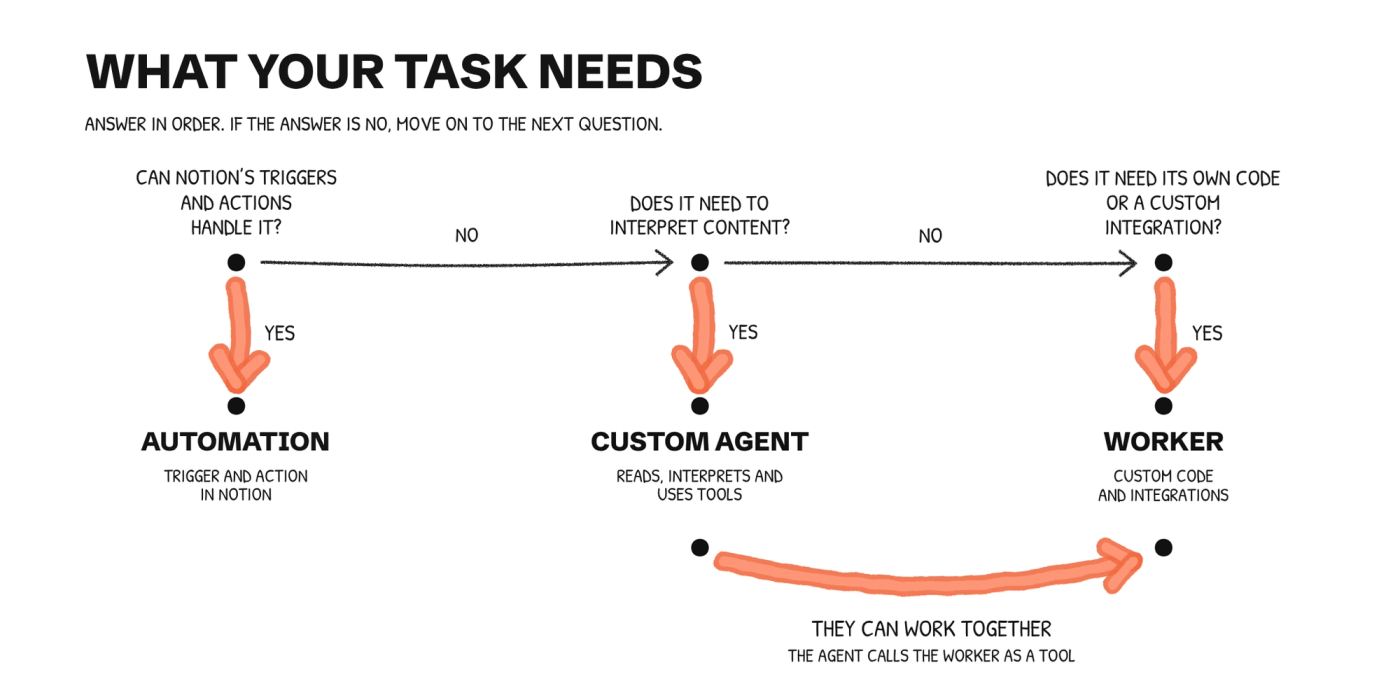
When you can define in advance what triggers the process and what should happen afterward, we would start with a native automation.
For example: when a ticket moves to “Blocked,” notify the owner and create a follow-up task. Notion already has actions to send notifications and add pages to another database. You don't need to write code or ask an agent to interpret the ticket.
You also don't need to switch tools just because the rule involves a calculation. Automation actions support variables and formulas. What matters is whether Notion's tools can express the rule, not whether you can describe it in a single sentence.
That said, don't assume you can chain them without checking first: one database automation cannot trigger another. If your workflow depends on that, you need to change the design.
Even if a Notion Automation is not enough, you can still go with a deterministic workflow and use third party automation tools like Make, Zapier or n8n. The rule of thumb here is: if it is a deterministic workflow, go with a deterministic option. This will give you better results, and a lower cost.
When a Custom Agent makes sense
Imagine that every Friday you want to review open projects and get a summary of the blockers that deserve attention. You're not looking for a list of every task that changed, but for an explanation of what is happening and what to review first.
A Custom Agent can read the sources you have authorized, apply your criteria, and prepare that report on a schedule.
But you have to explain what “deserves attention” means. An overdue date? A commitment to a client? A blocker repeated across several projects? If you haven't defined the criteria, the agent will have to interpret them on its own.
In that example, we would ask it to link the tasks that justify each alert and save the report for review. We would not give it permission to change dates or reassign work just because it can.
If you are still testing what the report should look like, start by generating it from the chat and reviewing the result. There will be time to let it run on its own once you know the exceptions.
When you need a Worker
A Worker makes sense when you need your own code: calling an API, transforming a response, or keeping a Notion database up to date with data from another system. Notion hosts and runs it on its own infrastructure. You don't have to set up a server, but someone has to maintain the code and the connections.
One example is bringing Zendesk tickets into a Notion database and keeping them up to date. If you only need to copy certain fields and update changes, there is nothing an AI needs to decide. A sync Worker can handle that work on its own.
A Worker can also give a tool to an agent. For example, the Worker queries an internal system and returns the status of an order; the agent then uses that data to prepare a reply. In that case, they do work together.
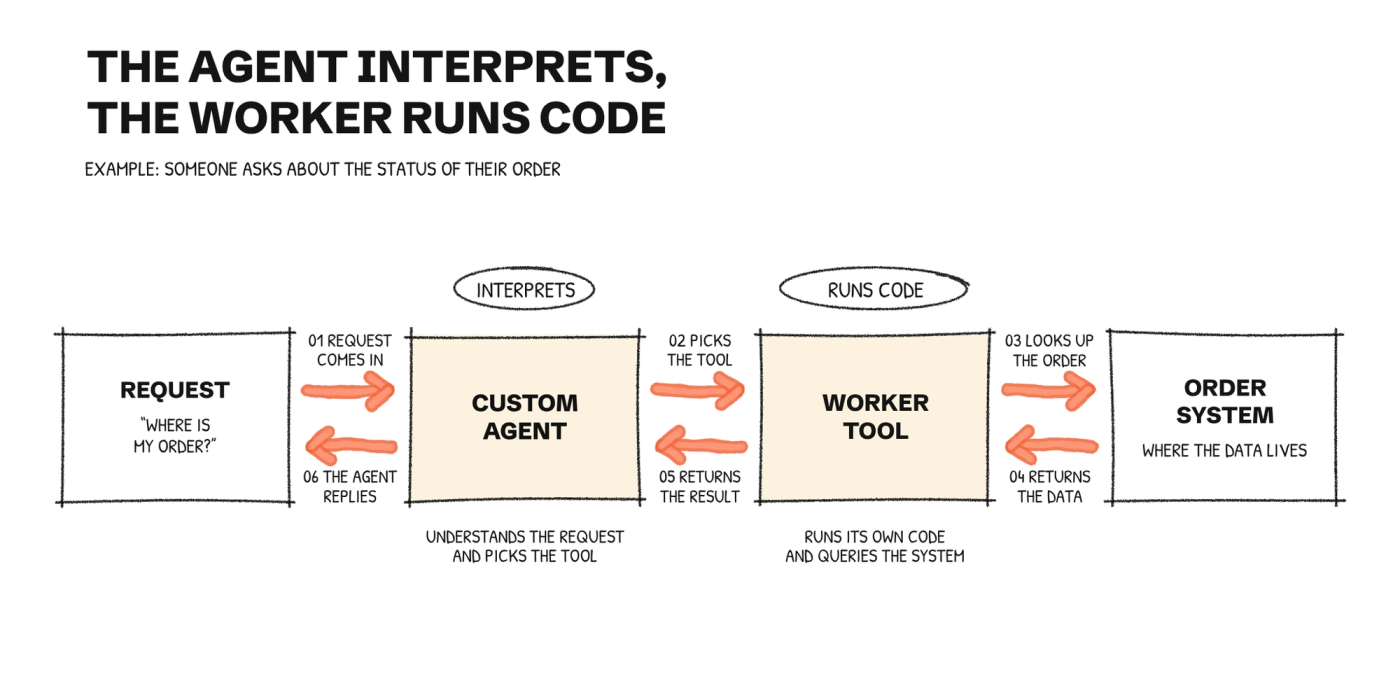
And if the process starts with an external event, such as a subscription change, a webhook lets the Worker receive it and run the code you have set up for it.
Before you build one, check whether an existing connection already solves the task. Being able to write code doesn't mean it's worth doing.
What about Skills
A Skill contains reusable instructions. It can explain how to write the report, which sources to check, or when to stop, but it doesn't replace the permissions, connections, and triggers of a Custom Agent.
You can use it from your personal agent, or give a Custom Agent access to it so the agent applies it. We cover this with examples in the article on what Notion Skills are and how to create them.
The permissions to review
Here, the three options work differently.
Automations: editing the database is not enough
To create, edit, or delete automations, you need a paid plan and full access to the database. Guests cannot create them, even with full access.
The Free plan has two exceptions: it lets you create Slack notification automations and use the ones included in templates, without editing them. That's why it isn't accurate to say the Free plan “only has buttons.”
If the automation changes another database, you also need permission to edit the destination. Notion states that automations do not act on pages with restricted access.
Custom Agents: check the sources and who you share it with
A Custom Agent has its own permissions. It does not use the permissions of the person asking it a question. You have to configure which pages, databases, and apps it can use in Tools and Access; pasting a link into the instructions does not replace that step.
This has an important consequence: if you share an agent that can read internal budgets, anyone who uses it can get information from those budgets, even if they can't open the original pages.
So review both things: what the agent can read or change, and who can talk to it. If you need to limit specific properties, our guide to column-level permissions in Notion explains that part of the system.
Workers: creating the code and accessing the data are different permissions
Being able to view a Notion page doesn't mean you can deploy a Worker in that workspace. An owner controls who can create them. By default, only the person who created a Worker can edit it or add it as a connection; to let others manage it or connect it to an agent, you need to share it.
The database a sync writes to has its own sharing permissions, like any other Notion database. And if the code calls an external app, you will also need to check that app's credentials and permissions. Sharing the Worker does not resolve all of those access questions on its own.
How much each option costs
Native automation is included in the Plus plan and higher. If that's the only requirement, first check which Notion plan your team needs. We wouldn't move to Business just for a rule you can set up on Plus.
With a Custom Agent, you need to separate the plan from usage. By default, it uses the Select credits of its owner; a workspace owner can fund it with a Notion credits budget. There is no single price that fits every report or classification. You can check the funding model in the guide to credits for Custom Agents.
If you buy Notion credits, the published reference is $10 per 1,000 monthly credits and $13 per 1,000 annual credits. Monthly credits reset every month; annual credits form a pool you can use until the subscription renews. They are not two monthly prices for the same package.
For Workers, Notion publishes about $0.0023 per run as a reference. Its examples include a daily sync for about $0.07 a month and an hourly sync for about $1.66 a month. These are usage examples, not budgets for any integration.
And if an agent calls a Worker's tools, count both kinds of usage. Each call is a Worker run; the agent's work is billed separately. Don't use a Workers cost example to estimate what the agent will cost you.
What we would avoid when setting it up
The first mistake is using an agent to run a closed rule. If the status and the owner are already defined, asking it to interpret them again adds cost and a risk of error you don't need.
The second is building a Worker before checking the native actions. Even if each run is cheap, the code needs maintenance. An integration stops being a solution when nobody knows what to do when it fails.
We would also avoid giving access to the entire workspace just to save setup time. The agent needs the sources for its task, not every document in the company. That groundwork is covered in AI agents in Notion: what to prepare before creating your first one.
Our advice: test one specific task and check the result before expanding its scope. For a ticket alert, it is enough to verify that it reaches the right person. For a report, you will also need to check whether the points it raises are backed by the sources.
In short, take a step back and think about the process. Do the hard work first. Once you have some clarity about the process, pick the simplest option that can handle it.
How noxen studio can help you
If it's not clear which option fits, we can review the process with you and the Notion system where it needs to work. From there, we decide what can be solved with native features, what needs an agent, and where writing code is worth it.
Tell us what you want to solve in the form to book a discovery call and we'll see where to start.