
Every AI conversation this year ends in the same place. The model is not the bottleneck. The data is.
The numbers say the same thing. Gartner predicts that through 2026, organizations will abandon 60% of AI projects that are not supported by AI-ready data (Gartner, 2025). A 2026 report from Cloudera and Harvard Business Review Analytic Services found that only 7% of enterprises say their data is completely ready for AI, and only 23% have an established data strategy for it (Cloudera, 2026).
At the Notion Ambassadors Summit, people from the Notion team described where the product is heading: Notion as the Switzerland of AI. A neutral home for company context, where any model (Notion AI, Claude, ChatGPT) can work on top of the same information. Some of them called it Notion's north star right now.
We're not sure it's the right bet. Time will tell. But it comes with a condition: context only helps if it's organized. If your workspace has three client databases, five versions of the onboarding process and nobody knows which one is current, connecting AI just gives you faster wrong answers.
Saying "you need good data" is easy. This guide is about the how: the process we follow with clients to organize and clean company information so AI can use it.
What "AI-ready" means in a Notion workspace
For most teams, AI-ready doesn't mean a data warehouse. It means that when someone asks AI a question about the company, the answer comes from the right place and you can check where.
In practice, that requires four things:
- Each type of information has one home.
- Each home has an owner.
- It's easy to tell current information from outdated information.
- Permissions match who (and which agent) should see what.
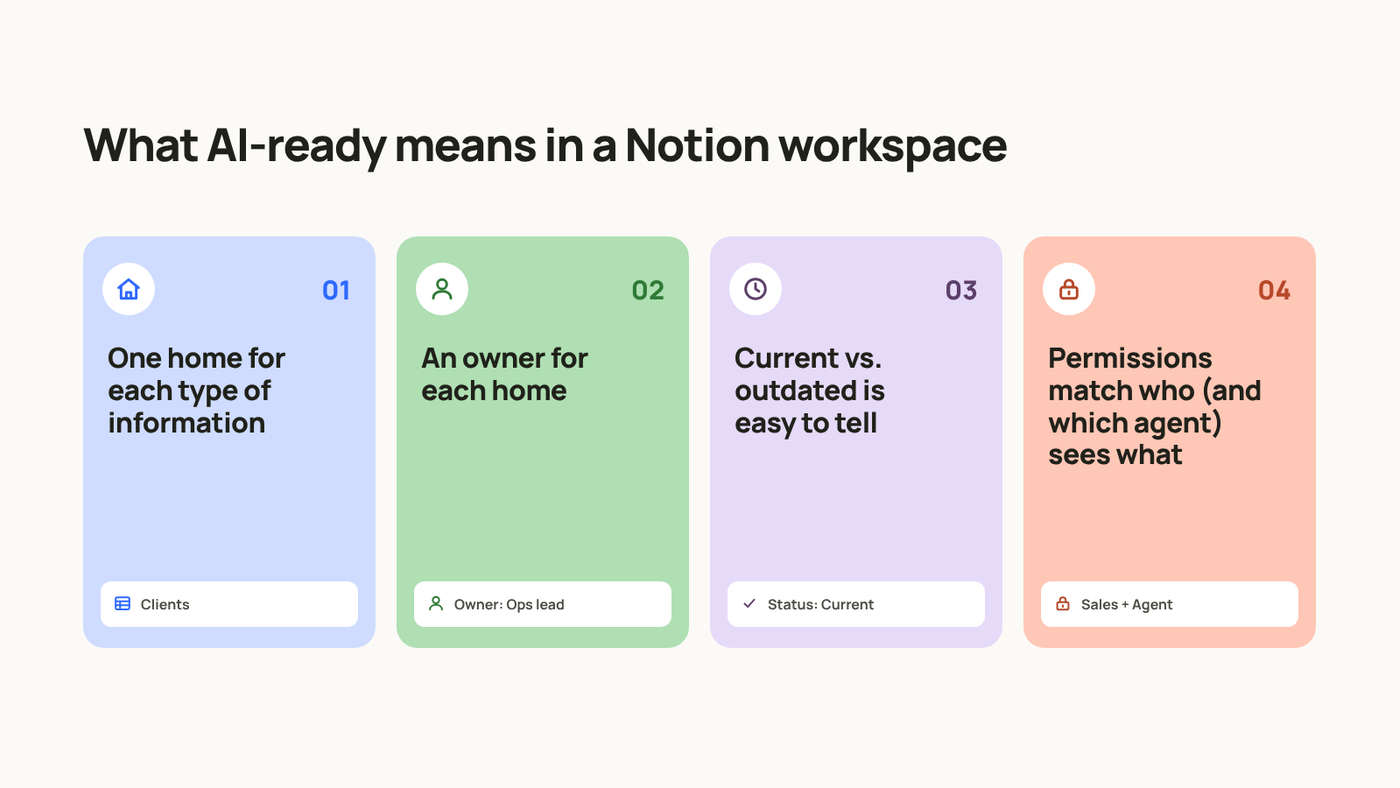
A simple test: if a new hire can't find the current version of a process without asking someone, AI won't find it either.
Step 1: Inventory where information lives today
Before touching Notion, find out where information actually lives. APQC found that knowledge workers spend 2.8 hours a week looking for or requesting information. That time usually goes into the same few questions: where is the latest version, who has it, which one is right.
Go department by department and write down, for each type of information, where it lives today, who updates it and how often. For example:
- Client contracts (Sales): Google Drive folder, updated by the account manager, per deal.
- Project status (Delivery): Notion and Slack threads, updated by the project lead, weekly.
- Invoices (Finance): accounting tool and a spreadsheet, updated by Finance, monthly.
- Processes and policies (Operations): Notion wiki, some in Docs, updated by nobody in particular, rarely.
This is an example. Yours will be longer, and that's the point. The usual result is the same information stored in two or three places, with no clear owner. That's exactly what AI will find when it searches.
Step 2: Map how data flows between departments
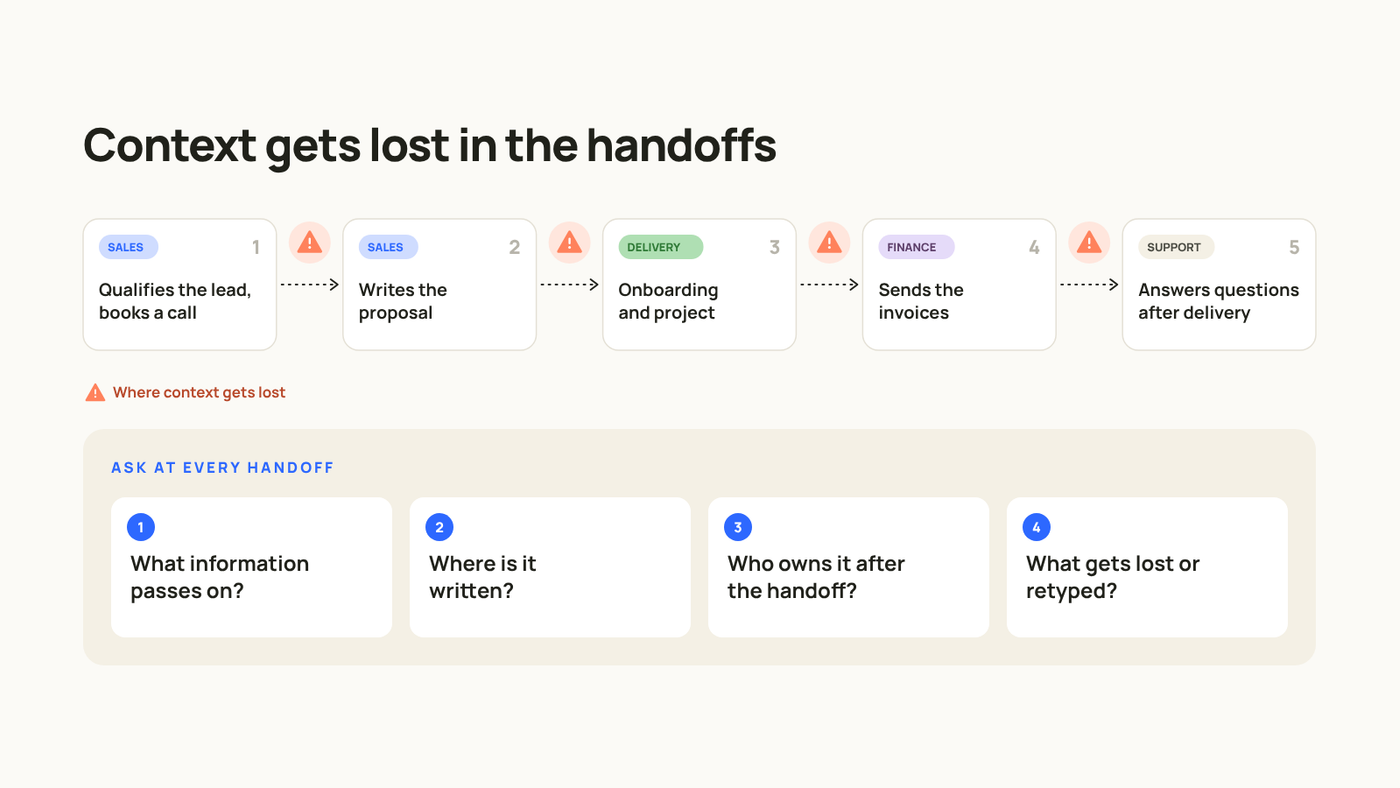
Most context doesn't get lost inside a department. It gets lost in the handoffs between them.
Pick one entity and follow it from start to finish. A client is usually the best example:
- Sales qualifies the lead and books a call.
- Sales writes the proposal.
- Delivery runs onboarding and the project.
- Finance sends invoices.
- Support handles questions after delivery.
At every handoff, ask four questions:
- What information passes from one team to the next?
- Where is it written down?
- Who is responsible for it after the handoff?
- What gets lost or retyped?
Then decide one source of truth for each core entity: clients, projects, tasks, documents, meetings. Write the rule down, including the moment something moves from one place to another.
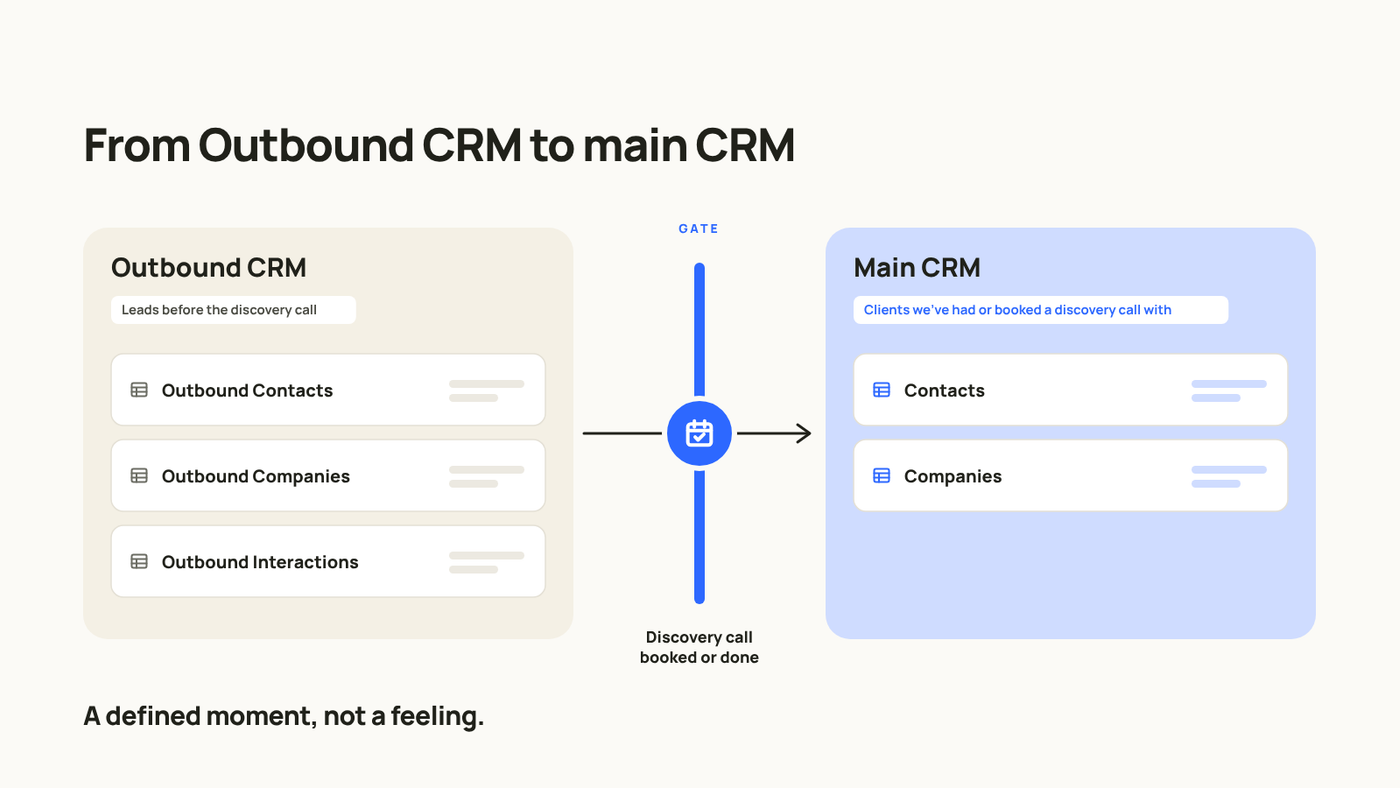
An example from our own system: we keep outbound leads and CRM clients in separate databases, and we defined exactly when a lead moves to the CRM (when a discovery call is booked or done). That rule lives in a page that both the team and our agents read. Without it, the same company would end up in both databases with different data.
Step 3: Design a small data model
Once you know the flows, design the structure. Keep it small. Most teams work well with a few core databases: tasks, projects, clients or contacts, a knowledge base and meetings.
Three rules we follow:
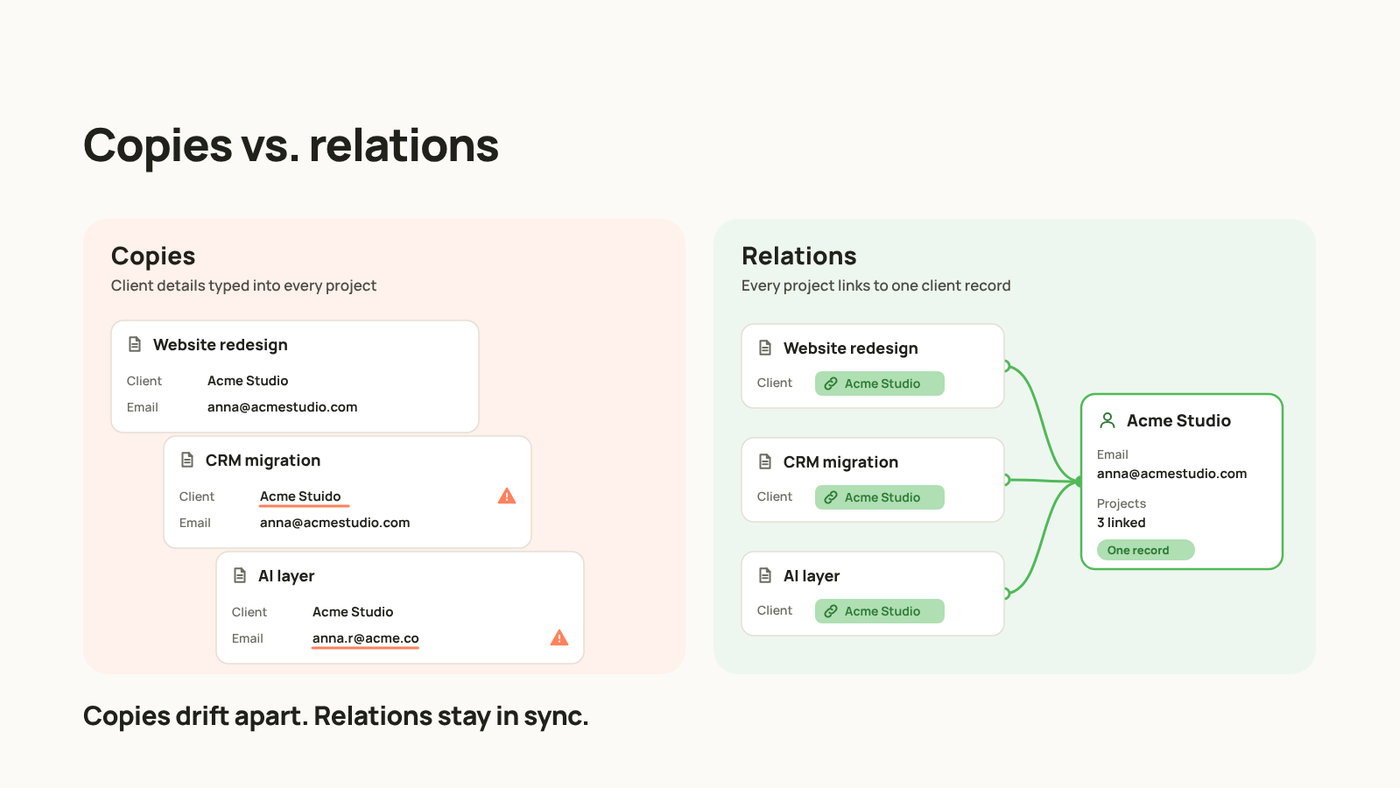
Relations instead of copies. If a project belongs to a client, relate the project to the client. Don't copy the client's name, email and contract details into the project. Copies drift apart; relations stay in sync.
One database per entity, filtered views per team. Instead of a tasks database for Marketing and another for Sales, use one tasks database with a Team property and a view for each team. AI then searches one place, and reporting across teams works.
A shared vocabulary. Words mean different things in different departments. For Finance, a "client" may be a signed account. For Sales, it may be anyone who booked a call. Write a short glossary page and use the same names in databases, properties and select options.
Also fill in database and property descriptions. People read them when they're unsure, and AI uses them to understand what a field means.
Step 4: Clean before you connect
This is the part most teams skip, and the one that makes the biggest difference. Our cleaning checklist:
- Merge duplicates. One database per entity type. Move the rows, keep the relations, then delete or archive the old database.
- Archive what isn't current. Finished projects, old versions, pages nobody has opened in months. If a page hasn't been opened in three months, review it or archive it.
- Standardize properties. The same select options everywhere, one date field per meaning, selects instead of free text where possible.
- Remove empty properties. If nobody fills it, it either needs an owner or it needs to go.
- Mark what's trusted. Use page verification on processes and policies that are approved and current, so people and AI can tell them apart from drafts.
- Add an owner and a review date to every key database and wiki section.
The order matters. Start with the information people will ask AI about most often, not with the oldest corner of the workspace.
Step 5: Set governance so it stays clean
Clean data doesn't stay clean on its own. Three things keep it that way:
Owners. Every database and wiki section has a person responsible for it. Not a team, a person.
A review rhythm. A short monthly or quarterly review of the core databases: what's outdated, what's duplicated, what nobody uses. When a process changes, the owner updates the source page, not a Slack message.
Permissions at the right level. Page access decides who can open a page. Property access decides what people can see or edit inside it, and agents can get their own permissions too. We covered this in more detail in a recent newsletter on property-level access. The rule of thumb: give each person and each agent access to what their work needs, and nothing more.
Step 6: Make the context readable for AI
With the structure clean, a few extra steps help AI give better answers:
- Write an AI standards page. List your sources of truth ("when we talk about clients, the source is this database") and the rules AI should follow, such as not creating new databases or checking before it writes. We keep ours as a Skill and reference it from our agents' instructions.
- Add summary properties. An AI Autofill summary on meeting notes or CRM records gives AI a short, consistent version of each page to work with.
- Limit agent access per workflow. An agent that writes follow-up emails doesn't need access to payroll.
- Test with real questions. Write down ten questions your team asks every week. Ask AI. Check whether each answer points to the right page. Every wrong answer shows you a gap in the structure.
The last point is the most useful one. It turns "is our data ready?" into a concrete list of things to fix.
FAQ
Do we need to clean everything before using AI?
No. Start with one department or one workflow, the one where people ask the most questions. Clean it, test it, then move to the next.
Should we move everything into Notion?
Not necessarily. Notion AI can search connected tools like Google Drive or Slack. What matters is that each type of information has one defined home and everyone knows which one it is.
Can AI help with the cleanup?
Yes, for repetitive work: tagging, summarizing, filling properties, flagging likely duplicates. Decide the structure first, then let AI help apply it.
What happens if we change AI models later?
That's the advantage of organizing context in one neutral place. The structure, the sources of truth and the permissions stay. The model on top can change.
How long does this take?
It depends on how much information you have and how many tools are involved. We usually scope it department by department so the team sees results early.
How we can help
You can do everything in this guide on your own. It just takes time, and it competes with the work your team already has on its plate.
If you don't have the hours to map flows, redesign databases and clean up years of pages, or you'd rather have someone who has done this with other teams look at your workspace with fresh eyes, that's where we come in. At noxen studio we map your data flows, design the data model in Notion and clean the workspace so AI can work on it.
Book a Discovery Call and we'll look at your case.